Designing for Advanced Technology
AR-Resus
Learning CPR through Augmented Reality
Revolutionising CPR training with an AR-based program - realistic, convenient, and engaging. No more time-consuming lectures or scheduling conflicts. Transform the way CPR is taught and learnt.
Problem Statement
How might we enable university students to perform CPR and other critical techniques on others in a timely and correct manner during emergencies through advanced technology, which allows them to help improve public health and potentially save lives in public places?
Duration
6 weeks
Role
-
Primary & Secondary Research
-
Persona
-
Empathy Mapping
-
Storytelling
-
Journey Mapping
-
Prioritisation Matrix
-
Low-fidelity prototyping
-
User testing
Assumptions & How Might We
We utilised a mind map to unpack our assumptions regarding awareness, existing solutions, target audience, risk factors, technological advancements, and awareness.

Which helped to formulate How might we statements. Based on the feasibility to the team and the statement that would create high user value was selected.

Target Users: Who & Why

University Students
"By creating a generation of active, involved, and prepared individuals who can help improve public health and potentially save lives can increase the survival rate of many individuals."
Countries that teach CPR to students in schools and universities have a higher survival rate than those that don’t.
Why University students are ideal users
-
Early Intervention
-
Greater Public awareness
-
Lifelong skill
-
Job Prospects
2
Participants who were previously trained in CPR were interviewed to get a deeper understanding of their pain points and experience. This helped to address the common issues they encountered.

Common Issues

Limited resuscitation training realism.
The training provided for CPR certification is often not realistic enough to allow for an easy transition from performing CPR on a mannequin to performing it in real-world situations.

Lack of personalised feedback
The user doesn’t get personalised feedback on their performance which leads to them being nervous during a real-life emergency.

Long waiting period for recap
Users are often required to wait for a specific period of time before being able to practice CPR again, which can result in difficulty retaining the information they learned.

Forgetfulness due to being anxious
Since the training environment would be different from the actual scenario, users might feel it difficult to remember the steps during the crucial period.
Persona
Using the insights gathered, a persona was created to match the user type.

Experience goals
-
To learn CPR in a way that is convenient and accessible for his busy schedule
-
To be able to get constructive feedback on his techniques.
Pain points
-
Because of his busy school schedule, he did not have much energy to do a CPR course in his spare time.
-
Uncertainty about his ability to perform CPR or use an automated external defibrillator in an emergency situation.
-
Uncertain about the quality of virtual or augmented reality training resources.
-
Was not sure if he was actually pressing in the correct position and if the timing was accurate when performing traditional CPR instruction.
Pain points
-
Add some fun to the whole process of learning CPR.
-
The learning experience can be personalised to suit the needs and level of the student.
Empathy Map
To gain a deeper understanding of the pain points, empathy maps are created to understand what the user thinks, feels, does, and says. This allows us to gain insights into the user’s experience

User Journey Mapping
By creating a user journey, it becomes possible to gain a more comprehensive understanding of the user's experience, including their pain points and any obstacles that may prevent or discourage them from achieving their objectives.

User need statement
“As a busy university student with a family member with a heart condition, I need a way to access high-quality CPR training that could simulate a real-life situation so that I could properly administer CPR to my family member in a timely manner and be able to respond confidently and effectively.”
UX vision statement
“We believe that there is an opportunity to improve the current teaching of CPR for university students by using AR technology to simulate a real emergency situation for them, which can be improved in time based on feedback as it is taught so that they can feel confident in their ability to perform CPR while gaining a sense of achievement, and respond in an emergency situation.”
Features
Drawing from the above data, three valuable insights were derived that greatly contributed to finalising features for the application.

01.
Enhanced immersion
Using *immersion as well as manipulating it can lead to better training software that engages the user in learning. *Stimulating a real-life environment helps gain confidence in performing CPR in real-life.
02.
Real-time feedback
User can receive feedback on their techniques, and how it affects the body.


03.
Visualised quiz
Visualised quizzes can be an effective tool for improving memory retention of important information, as they engage multiple senses and cognitive processes, provide visual aids, and offer feedback and reinforcement.
*Auralization: To make the sound more realistic, our sound needs to be captured both far and near, and the size of the user's room will also change the reflection of the sound. This will give the user a more immersive experience.
*Stimulation: The extent to which a person’s cognitive and perceptual systems are tricked into believing they are somewhere other than their physical location.
Ideation
After several design concept iterations, we have defined all the touchpoints that users will encounter while using the application. The concept includes two distinct modes for users to choose from: LEARN and TRAIN.
In the LEARN mode, users have the option to either refresh their CPR training or provide training to first-time users.
On the other hand, the TRAIN mode enables users to participate in a visualised quiz-like activity, allowing them to assess their knowledge and understanding of CPR techniques. This division of modes aims to provide users with a comprehensive and interactive learning experience.


Design concept testing
Based on the key features finalised, initial design concepts were drawn and tested out and enabling us to question each interaction and touchpoint.

During the body storming session, the focus centred on user interaction with a mannequin during CPR training. The primary goal was to create a lifelike environment, fostering full immersion and confidence in handling life-threatening situations. The key objectives included visualising the correct pressure, hand placement, and compression depth.
Through this process, we recognised the importance of addressing the challenge of helping users maintain the correct rhythm for compressions while simultaneously absorbing other critical information.

During the experiments, it was discovered that performing CPR effectively requires a rate of approximately 120 compressions per minute, which translates to two compressions per second. However, the observation made was that users found it challenging to follow the cues at such a rapid pace.
Final deliverables
The high-fidelity prototype of the application endeavours to faithfully demonstrate its primary touchpoints, prioritizing realism. However, a challenge arose during the prototyping process as an actual mannequin was not available, leading to the utilization of a mimicked alternative.

The users are given two options,
learn or train

The starting point to commence learning CPR.

Users are first prompted with gestures to allow them enough time to adjust their stance.
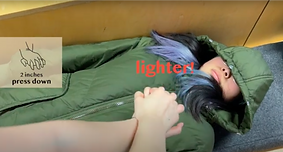
Personalised feedbacks on the methods used

Information on what each element represents

Provide users with simulations of various scenarios to ensure they are prepared when faced with them.
User Testing
The prototype was tested against 6 students.
4
Students who hadn't taken CPR training before
2
Students who had taken CPR training at least once.
Information such as visual information viability, Process rationalisation was collected through the process of interviewing the users, asking the users to think out loud when interacting with the prototype.


USE Score:
In summary: all users were relatively satisfied with our process, with the highest score being 75, the lowest score being 54.2 and the average being 65.
Limitations
1. The smart glasses have a limited Field of View (FoV)
2. Expensive Learning Curve - as AR glasses can be quite expensive, users must invest time learning new technology.
3. Overuse of technology can cause a false sense of confidence in trainees as they may rely too heavily on the technology and not perform CPR effectively in real-life situations.
Future Outlook
1. In future versions we hope to include more precise performance analysis such as hand position, pose detection etc.
2. Use of assisted reality that reduces the number of interactions users have with the application allows for less distraction during emergencies.
3. Replacing traditional CPR training methods that use mannequins with haptic gloves that provide the same feedback.
4. Get started immediately with intuitive, easy-to-wear AR headsets.
5. Deliver first-class surgical treatment with lower costs and better efficiency.
Reflection
Accuracy and Reliability: Ensuring the feedback provided during CPR instruction through AR technology is timely and reliable is crucial, as it directly impacts the lives of others. Designing a trustworthy system that offers accurate guidance becomes a top priority.
Fairness and Accessibility: It's essential to acknowledge that AR technology for CPR training might not be accessible to all schools, especially those in low-income areas or developing countries. As a designer, considering ways to address this issue and promote inclusivity becomes a significant aspect of the project.
Challenges with Posture Detection: The current AR glasses face difficulties in accurately detecting the user's posture during CPR training. Finding innovative solutions to overcome this limitation will be important to enable independent learning without the need for a teacher's supervision.
AR as an Aid, Not a Replacement: Understanding that AR technology should not replace human judgment and decision-making but rather serve as a useful tool to assist healthcare professionals with CPR is essential. Striking the right balance between technology and human intervention is a critical consideration.


